What happens
Open the sidebar project filter (the "All projects" dropdown) with the mouse. The first project row is highlighted as if hovered, even though the pointer is not over it. The highlight only appears when the menu is opened by mouse; keyboard open highlights "All projects" as expected.
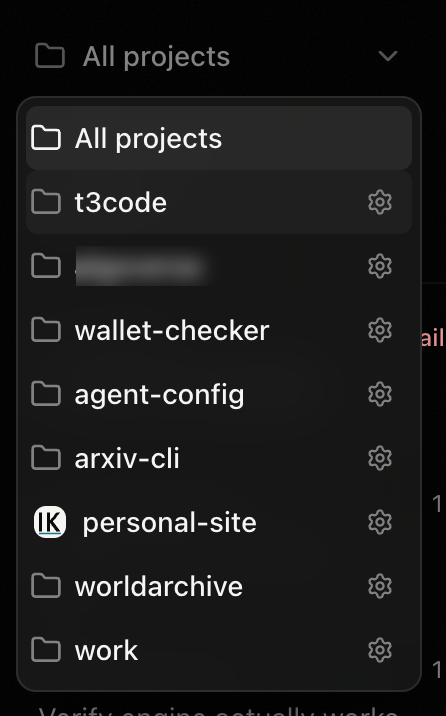
Why
Base UI's MenuPopup focuses the first tabbable element in the popup on open. Menu rows are tabIndex=-1 until one is highlighted, so the first tabbable element is the project settings gear <Button> inside the first project row. Focus bubbles into that row, Base UI marks it active, and it renders highlighted. "All projects" has no gear, so it is skipped.
Verified
Redirecting only the open-time auto-focus from the gear to the menu popup makes the menu open with no row highlighted; arrow keys, Tab to the gear, and the gear's mouse click still work. (Plain tabIndex={-1} on the gear also fixes the highlight but removes the Tab path to project settings.)
Related: #1399 and #5521 cover the broader keyboard/screen-reader story for these gear buttons.
What happens
Open the sidebar project filter (the "All projects" dropdown) with the mouse. The first project row is highlighted as if hovered, even though the pointer is not over it. The highlight only appears when the menu is opened by mouse; keyboard open highlights "All projects" as expected.
Why
Base UI's
MenuPopupfocuses the first tabbable element in the popup on open. Menu rows aretabIndex=-1until one is highlighted, so the first tabbable element is the project settings gear<Button>inside the first project row. Focus bubbles into that row, Base UI marks it active, and it renders highlighted. "All projects" has no gear, so it is skipped.Verified
Redirecting only the open-time auto-focus from the gear to the menu popup makes the menu open with no row highlighted; arrow keys, Tab to the gear, and the gear's mouse click still work. (Plain
tabIndex={-1}on the gear also fixes the highlight but removes the Tab path to project settings.)Related: #1399 and #5521 cover the broader keyboard/screen-reader story for these gear buttons.