Releases: microsoft/playwright-java
v1.59.0

🎬 Screencast
New page.screencast API provides a unified interface for capturing page content with:
- Screencast recordings
- Action annotations
- Visual overlays
- Real-time frame capture
- Agentic video receipts
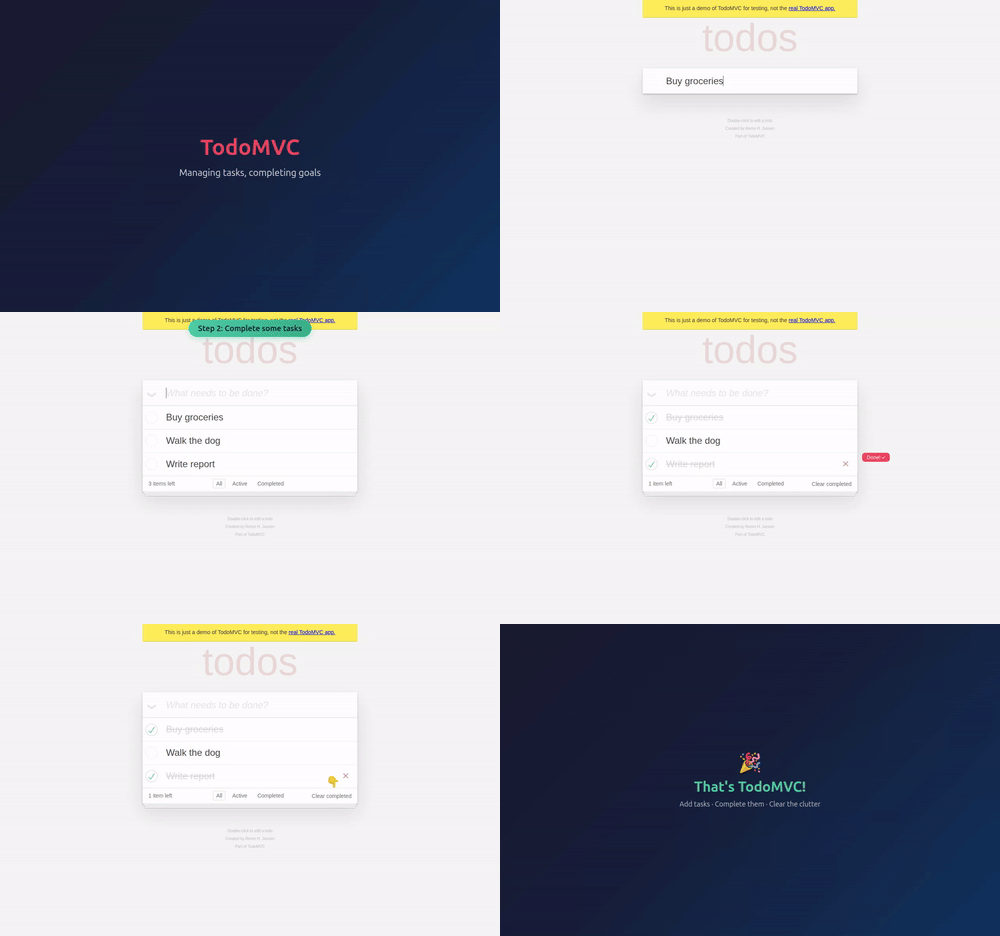
Screencast recording — record video with precise start/stop control, as an alternative to the recordVideoDir option:
page.screencast().start(new Screencast.StartOptions().setPath(Paths.get("video.webm")));
// ... perform actions ...
page.screencast().stop();
Action annotations — enable built-in visual annotations that highlight interacted elements and display action titles during recording:
page.screencast().showActions(new Screencast.ShowActionsOptions().setPosition("top-right"));screencast.showActions() accepts position ("top-left", "top", "top-right", "bottom-left", "bottom", "bottom-right"), duration (ms per annotation), and fontSize (px). Returns a disposable to stop showing actions.
Visual overlays — add chapter titles and custom HTML overlays on top of the page for richer narration:
page.screencast().showChapter("Adding TODOs",
    new Screencast.ShowChapterOptions()
        .setDescription("Type and press enter for each TODO")
        .setDuration(1000));

page.screencast().showOverlay("<div style=\"color: red\">Recording</div>");
Real-time frame capture — stream JPEG-encoded frames for custom processing like thumbnails, live previews, AI vision, and more:
page.screencast().start(new Screencast.StartOptions()
    .setOnFrame(frame -> sendToVisionModel(frame.data)));
Agentic video receipts — coding agents can produce video evidence of their work. After completing a task, an agent can record a walkthrough video with rich annotations for human review:
page.screencast().start(new Screencast.StartOptions()
    .setPath(Paths.get("receipt.webm")));
page.screencast().showActions(new Screencast.ShowActionsOptions().setPosition("top-right"));

page.screencast().showChapter("Verifying checkout flow",
    new Screencast.ShowChapterOptions()
        .setDescription("Added coupon code support per ticket #1234"));

// Agent performs the verification steps...
page.locator("#coupon").fill("SAVE20");
page.locator("#apply-coupon").click();
assertThat(page.locator(".discount")).containsText("20%");

page.screencast().showChapter("Done",
    new Screencast.ShowChapterOptions()
        .setDescription("Coupon applied, discount reflected in total"));

page.screencast().stop();
The resulting video serves as a receipt: chapter titles provide context, action annotations highlight each interaction, and the visual walkthrough is faster to review than text logs.
🔍 Snapshots and Locators
- Method page.ariaSnapshot() to capture the aria snapshot of the page — equivalent to
page.locator("body").ariaSnapshot(). - Options
depthandmodein locator.ariaSnapshot(). - Method locator.normalize() converts a locator to follow best practices like test ids and aria roles.
- Method page.pickLocator() enters an interactive mode where hovering over elements highlights them and shows the corresponding locator. Click an element to get its Locator back. Use page.cancelPickLocator() to cancel.
New APIs
Screencast
- page.screencast provides video recording, real-time frame streaming, and overlay management.
- Methods screencast.start() and screencast.stop() for recording and frame capture.
- Methods screencast.showActions() and screencast.hideActions() for action annotations.
- Methods screencast.showChapter() and screencast.showOverlay() for visual overlays.
- Methods screencast.showOverlays() and screencast.hideOverlays() for overlay visibility control.
Storage, Console and Errors
- Method browserContext.setStorageState() clears existing cookies, local storage, and IndexedDB for all origins and sets a new storage state — no need to create a new context.
- Methods page.clearConsoleMessages() and page.clearPageErrors() to clear stored messages and errors.
- Option
filterin page.consoleMessages() and page.pageErrors() controls which messages are returned. - Method consoleMessage.timestamp().
Miscellaneous
- browserContext.debugger() provides programmatic control over the Playwright debugger.
- Method browserContext.isClosed().
- Method request.existingResponse() returns the response without waiting.
- Method response.httpVersion() returns the HTTP version used by the response.
- Option
livein tracing.start() for real-time trace updates. - Option
artifactsDirin browserType.launch() to configure the artifacts directory.
🔗 Interoperability
New browser.bind() API makes a launched browser available for playwright-cli, @playwright/mcp, and other clients to connect to.
Bind a browser — start a browser and bind it so others can connect:
Browser.BindResult serverInfo = browser.bind("my-session",
    new Browser.BindOptions().setWorkspaceDir("/my/project"));
Connect from playwright-cli — connect to the running browser from your favorite coding agent.
playwright-cli attach my-session
playwright-cli -s my-session snapshot
Connect from @playwright/mcp — or point your MCP server to the running browser.
@playwright/mcp --endpoint=my-sessionConnect from a Playwright client — use API to connect to the browser. Multiple clients at a time are supported!
Browser browser = chromium.connect(serverInfo.endpoint);Pass host and port options to bind over WebSocket instead of a named pipe:
Browser.BindResult serverInfo = browser.bind("my-session",
    new Browser.BindOptions().setHost("localhost").setPort(0));
// serverInfo.endpoint is a ws:// URL
Call browser.unbind() to stop accepting new connections.
📊 Observability
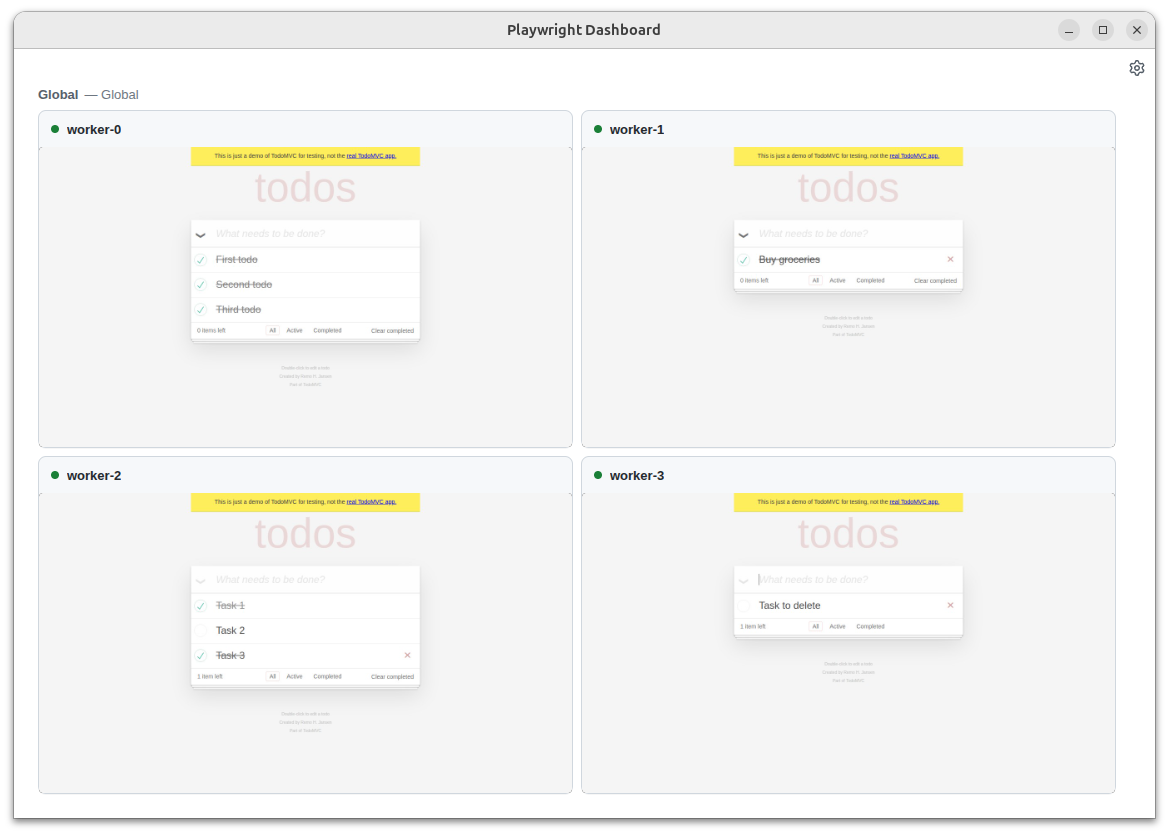
Run playwright-cli show to open the Dashboard that lists all the bound browsers, their statuses, and allows interacting with them:
- See what your agent is doing on the background browsers
- Click into the sessions for manual interventions
- Open DevTools to inspect pages from the background browsers.
Breaking Changes ⚠️
- Removed macOS 14 support for WebKit. We recommend upgrading your macOS version, or keeping an older Playwright version.
Browser Versions
- Chromium 147.0.7727.15
- Mozilla Firefox 148.0.2
- WebKit 26.4
This version was also tested against the following stable channels:
- Google Chrome 146
- Microsoft Edge 146
v1.58.0
UI Mode and Trace Viewer Improvements
- New 'system' theme option follows your OS dark/light mode preference
- Search functionality (Cmd/Ctrl+F) is now available in code editors
- Network details panel has been reorganized for better usability
- JSON responses are now automatically formatted for readability
Thanks to @cpAdm for contributing these improvements!
Miscellaneous
browserType.connectOverCDP() now accepts an isLocal option. When set to true, it tells Playwright that it runs on the same host as the CDP server, enabling file system optimizations.
Breaking Changes ⚠️
- Removed
_reactand_vueselectors. See locators guide for alternatives. - Removed
:lightselector engine suffix. Use standard CSS selectors instead. - Option
devtoolsfrom browserType.launch() has been removed. UsesetArgs(Arrays.asList("--auto-open-devtools-for-tabs"))instead. - Removed macOS 13 support for WebKit. We recommend to upgrade your macOS version, or keep using an older Playwright version.
Browser Versions
- Chromium 145.0.7632.6
- Mozilla Firefox 146.0.1
- WebKit 26.0
This version was also tested against the following stable channels:
- Google Chrome 144
- Microsoft Edge 144
v1.57.0
Chrome for Testing
Starting with this release, Playwright switches from Chromium, to using Chrome for Testing builds. Both headed and headless browsers are subject to this. Your tests should still be passing after upgrading to Playwright 1.57.
We're expecting no functional changes to come from this switch. The biggest change is the new icon and title in your toolbar.

If you still see an unexpected behaviour change, please file an issue.
On Arm64 Linux, Playwright continues to use Chromium.
Breaking Change
After 3 years of being deprecated, we removed page.accessibility() from our API. Please use other libraries such as Axe if you need to test page accessibility. See our Node.js guide for integration with Axe.
New APIs
- worker. onConsole event is emitted when JavaScript within the worker calls one of console API methods, e.g. console.log or console.dir.
Worker.waitForConsoleMessage()can be used to wait for it. - locator.description() returns locator description previously set with locator.describe().
- New option
stepsin locator.click() and locator.dragTo() that configures the number ofmousemoveevents emitted while moving the mouse pointer to the target element.
Browser Versions
- Chromium 143.0.7499.4
- Mozilla Firefox 144.0.2
- WebKit 26.0
v1.56.0
New APIs
- New methods page.consoleMessages() and page.pageErrors() for retrieving the most recent console messages from the page
- New method page.requests() for retrieving the most recent network requests from the page
Breaking Changes
- Event browserContext.onBackgroundPage has been deprecated and will not be emitted. Method browserContext.backgroundPages() will return an empty list
Miscellaneous
- Aria snapshots render and compare
inputplaceholder
Browser Versions
- Chromium 141.0.7390.37
- Mozilla Firefox 142.0.1
- WebKit 26.0
v1.55.0
Codegen
- Automatic
isVisible()assertions: Codegen can now generate automaticisVisible()assertions for common UI interactions. This feature can be enabled in the Codegen settings UI.
Breaking Changes
⚠️ Dropped support for Chromium extension manifest v2.
Miscellaneous
- Added support for Debian 13 "Trixie".
Browser Versions
- Chromium 140.0.7339.16
- Mozilla Firefox 141.0
- WebKit 26.0
This version was also tested against the following stable channels:
- Google Chrome 139
- Microsoft Edge 139
v1.54.0
Highlights
-
New cookie property
partitionKeyin browserContext.cookies() and browserContext.addCookies(). This property allows to save and restore partitioned cookies. See CHIPS MDN article for more information. Note that browsers have different support and defaults for cookie partitioning. -
New option
--user-data-dirin multiple commands. You can specify the same user data dir to reuse browsing state, like authentication, between sessions.mvn exec:java -e -D exec.mainClass=com.microsoft.playwright.CLI -D exec.args="codegen --user-data-dir=./user-data" -
mvn exec:java -e -D exec.mainClass=com.microsoft.playwright.CLI -D exec.args=opencommand does not open the test recorder anymore. Usemvn exec:java -e -D exec.mainClass=com.microsoft.playwright.CLI -D exec.args=codegeninstead.
Browser Versions
- Chromium 139.0.7258.5
- Mozilla Firefox 140.0.2
- WebKit 26.0
This version was also tested against the following stable channels:
- Google Chrome 140
- Microsoft Edge 140
v1.53.0
Miscellaneous
-
New Steps in Trace Viewer:

-
New method locator.describe() to describe a locator. Used for trace viewer.
Locator button = page.getByTestId("btn-sub").describe("Subscribe button");
button.click();
-
mvn exec:java -e -D exec.mainClass=com.microsoft.playwright.CLI -D exec.args="install --list"will now list all installed browsers, versions and locations.
Browser Versions
- Chromium 138.0.7204.4
- Mozilla Firefox 139.0
- WebKit 18.5
This version was also tested against the following stable channels:
- Google Chrome 137
- Microsoft Edge 137
v1.52.0

Highlights
-
New method assertThat(locator).containsClass() to ergonomically assert individual class names on the element.
assertThat(page.getByRole(AriaRole.LISTITEM, new Page.GetByRoleOptions().setName("Ship v1.52")))
  .containsClass("done");
-
Aria Snapshots got two new properties:
/childrenfor strict matching and/urlfor links.assertThat(locator).matchesAriaSnapshot(""" - list - /children: equal - listitem: Feature A - listitem: - link "Feature B": - /url: "https://playwright.dev" """);
Miscellaneous
- New option
setMaxRedirectsin apiRequest.newContext() to control the maximum number of redirects. - New option
setRefin locator.ariaSnapshot() to generate reference for each element in the snapshot which can later be used to locate the element.
Breaking Changes
- Method route.continue() does not allow to override the
Cookieheader anymore. If aCookieheader is provided, it will be ignored, and the cookie will be loaded from the browser's cookie store. To set custom cookies, use browserContext.addCookies(). - macOS 13 is now deprecated and will no longer receive WebKit updates. Please upgrade to a more recent macOS version to continue benefiting from the latest WebKit improvements.
Browser Versions
- Chromium 136.0.7103.25
- Mozilla Firefox 137.0
- WebKit 18.4
This version was also tested against the following stable channels:
- Google Chrome 135
- Microsoft Edge 135
v1.51.0
Highlights
-
New option
setIndexedDBfor browserContext.storageState() allows to save and restore IndexedDB contents. Useful when your application uses IndexedDB API to store authentication tokens, like Firebase Authentication.Here is an example following the authentication guide:
// Save storage state into the file. Make sure to include IndexedDB.
context.storageState(new BrowserContext.StorageStateOptions()
    .setPath(Paths.get("state.json"))
    .setIndexedDB(true));

// Create a new context with the saved storage state.
BrowserContext context = browser.newContext(new Browser.NewContextOptions()
    .setStorageStatePath(Paths.get("state.json")));
-
New option
setVisiblefor locator.filter() allows matching only visible elements.// Ignore invisible todo items. Locator todoItems = page.getByTestId("todo-item") .filter(new Locator.FilterOptions().setVisible(true)); // Check there are exactly 3 visible ones. assertThat(todoItems).hasCount(3);
-
New option
setContrastfor methods page.emulateMedia() and browser.newContext() allows to emulate theprefers-contrastmedia feature. -
New option
setFailOnStatusCodemakes all fetch requests made through the APIRequestContext throw on response codes other than 2xx and 3xx.
Browser Versions
- Chromium 134.0.6998.35
- Mozilla Firefox 135.0
- WebKit 18.4
This version was also tested against the following stable channels:
- Google Chrome 133
- Microsoft Edge 133
v1.50.0
Miscellaneous
- Added method assertThat(locator).hasAccessibleErrorMessage() to assert the Locator points to an element with a given aria errormessage.
UI updates
- New button in Codegen for picking elements to produce aria snapshots.
- Additional details (such as keys pressed) are now displayed alongside action API calls in traces.
- Display of
canvascontent in traces is error-prone. Display is now disabled by default, and can be enabled via theDisplay canvas contentUI setting. CallandNetworkpanels now display additional time information.
Breaking
- assertThat(locator).isEditable() and locator.isEditable() now throw if the target element is not
<input>,<select>, or a number of other editable elements.
Browser Versions
- Chromium 133.0.6943.16
- Mozilla Firefox 134.0
- WebKit 18.2
This version was also tested against the following stable channels:
- Google Chrome 132
- Microsoft Edge 132